
 ultimate-guide
Automate Customer Journey for Your Ecommerce Store
Table of Contents
- Why Automating the Customer Journey Matters in 2026
- Mapping Customer Touchpoints Before You Automate
- Ecommerce Marketing Automation Tools: What Each Layer Does
- Automated Cart Recovery Strategies That Recover Revenue
- How an AI Chatbot for Shopify Handles Real Objections
- Building the Workflow: Step-by-Step Setup
- Measuring and Optimizing Your Automated Journeys
- Frequently Asked Questions
Last Updated: October 6, 2026
Why Automating the Customer Journey Matters in 2026
One-third of U.S. consumers now prefer automated or digital purchasing over human interaction, according to Salesforce's 2026 ecommerce statistics. To automate customer journey ecommerce store operations is no longer a competitive edge.
Here is the throughline most guides miss: automation is not a tool you install. It is a data pipeline you build, and the pipeline is only as good as the customer data flowing through it.
Mapping Customer Touchpoints Before You Automate
Automating a journey you have not mapped is the single most common mistake we see. You end up with disconnected triggers firing at the wrong moment, and customers notice.
Customer journey mapping is the process of documenting every touchpoint a shopper passes through, from first ad impression to repeat purchase, and the data each touchpoint produces. Start with a simple inventory:
- Ad click (source, campaign, creative)
- Landing page view (session, device, referrer)
- Product page browse (SKU, time on page)
Journey Stages and the Data Each One Produces
Each stage generates a distinct data signal, and each signal powers a different automation. Awareness produces click and impression data for targeting. Consideration produces browse and cart data for recovery.
The practical takeaway: build your data model around stages, not around channels. When a shopper moves from browse to cart, that transition, not the channel they used, is what should fire your next automated message.
Ecommerce Marketing Automation Tools: What Each Layer Does
Ecommerce marketing automation tools fall into four layers, and confusing them is why so many stacks underperform.
The ad layer handles targeting, bidding, and creative testing. The on-site layer handles chat, objection handling, and cart recovery in real time.
Most stores buy tools from one layer and expect them to fix problems in another. A messaging platform cannot fix bad ad targeting.
| Layer | Primary Job | Where It Fails |
|---|---|---|
| Ad optimization | Targeting, bidding, creative | Cannot recover on-site abandonment |
| On-site conversion | Chat, objection handling | Needs clean product data |
| Messaging | Email and SMS sequences | Fires blind without journey data |
| Analytics | Attribution, reporting | Useless if events aren't tracked |
This is where an integrated platform changes the math. Our AI advertising platform connects the ad layer to the on-site layer so a shopper who clicked a specific creative gets a chat response that matches that creative.
Automated Cart Recovery Strategies That Recover Revenue
Automated cart recovery strategies work best when they match the reason for abandonment, not just the fact of it. A shopper who bailed at the shipping-cost screen needs a different message than one who left a product page open overnight.
The core sequence most stores should run:
- On-site recovery (0-2 minutes): A chat prompt offers help while intent is highest.
- First email (1 hour): A simple reminder with the cart contents.
- SMS (4 hours, opted-in only): Short nudge with a direct cart link.
- Second email (24 hours): Address the likely objection, such as shipping cost or sizing.
- Final email (72 hours): Urgency or a small incentive, then stop.
Stopping matters. Over-messaging trains shoppers to ignore you.
Timing, Channels, and Message Sequencing
Timing is the variable that moves recovery rates most, and it depends on your product. High-consideration items tolerate longer gaps between messages. Impulse items need faster follow-up. Test your sequence against your own data rather than copying a template.
Channel choice follows the same logic. Email handles detail and objection content. SMS handles speed and short reminders. On-site chat handles the moment of hesitation.
How an AI Chatbot for Shopify Handles Real Objections
An AI chatbot for Shopify earns its place when it answers the objections shoppers actually raise, at the moment they raise them. Generic bots fail because they deflect to a FAQ page. A useful one resolves the question in the conversation.
The objections we see most often in DTC are predictable: shipping time, return policy, sizing, and price justification. A well-configured bot answers each one directly, using your store's real policy data, and then offers the next step, such as adding the item back to cart.
This is the layer our Shopify AI Chatbot was built for: capturing the shopper's question on-site, resolving it, and recovering the sale before the tab closes.
Building the Workflow: Step-by-Step Setup
Total time: roughly one afternoon for a first workflow. Difficulty: Intermediate.
Most guides stop at "map your journey." The blueprint below goes further: it pairs each journey stage with a concrete trigger, an action, a delay, and an exit condition, so you can build the workflow in your automation tool instead of translating concepts into clicks.
What you'll need:
- Shopify admin access
- Your email and SMS platform connected
- Ad account access for click data
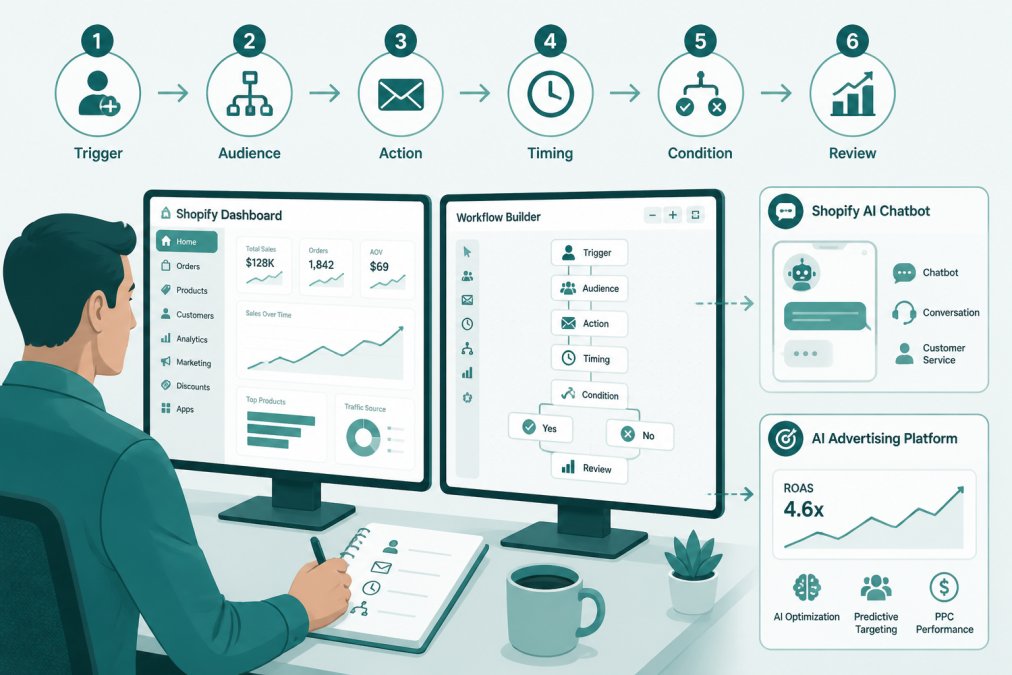
Workflow Recipes by Journey Stage
Each recipe below follows the same structure: trigger, action, delay, exit condition. Exit conditions matter as much as triggers, they are what stop a customer from receiving a cart email after they already bought.
AI Performance Marketing Platform →
Discovery (browse abandon)
- Trigger: product page viewed for 60+ seconds, no add-to-cart, session ends.
- Action: on-site chat prompt offering sizing or comparison help; if no chat engagement, one browse-abandon email at 24 hours.
- Delay: 24 hours for email; chat fires in-session.
- Exit: add-to-cart, purchase, or email unsubscribe.
Consideration (cart abandon)
- Trigger: cart created, no checkout start within 30 minutes.
- Action: on-site chat prompt at 2 minutes; reminder email at 1 hour; SMS at 4 hours (opted-in only); objection email at 24 hours; final email at 72 hours.
- Delay: staggered as above.
- Exit: checkout start, purchase, or message cap reached.
Purchase (checkout abandon)
- Trigger: checkout started, payment step not completed within 15 minutes.
- Action: single high-urgency email at 30 minutes with a direct return-to-checkout link; no SMS unless the shopper opted in at checkout.
- Delay: 30 minutes.
- Exit: purchase or 24-hour window closes.
Fulfillment (post-purchase)
- Trigger: order paid.
- Action: order confirmation immediately, shipping confirmation on fulfillment, delivery confirmation on carrier scan, review request 7 days after delivery.
- Delay: event-driven, not time-driven.
- Exit: return initiated or refund issued.
Retention (repeat purchase)
- Trigger: 60 days since delivery with no new order, for consumable or replenishable categories.
- Action: replenishment email with a one-click reorder link; loyalty-point reminder if a program exists.
- Delay: 60 days, tuned to your product's natural reorder cycle.
- Exit: new order placed or customer marked lapsed.
Connecting Shopify, Email, and Ad Data
Integration architecture is where most stacks quietly break. The rule is simple: one customer identifier across every system.
Connect in this order: Shopify first, then email, then ads. Data quality degrades the moment identifiers disagree, so validate that order IDs and customer emails match across systems before you trust any report.
Consent belongs in the same pipeline. Store email and SMS opt-in status alongside the customer record so a trigger can check permission before it fires.
Our AI performance marketing platform handles this cross-channel connection so click data and order data resolve to the same record, and so a shopper who clicked a specific creative gets a chat response that matches that creative.
Measuring and Optimizing Your Automated Journeys
Measurement is where automated journeys earn or lose their budget. Broad claims about "engagement" or "growth" tell you nothing about whether a workflow should keep running. Define a KPI per stage, measure it against a holdout, and retire anything that does not move it.
Stage-Specific KPIs
| Stage | Primary KPI | How to Measure It |
|---|---|---|
| Discovery | Browse-to-cart rate | Sessions with add-to-cart ÷ sessions with product view, split by whether chat fired |
| Consideration | Cart recovery rate | Recovered carts ÷ abandoned carts, per message in the sequence |
| Purchase | Checkout completion rate | Completed orders ÷ checkout starts, segmented by payment step reached |
| Fulfillment | Delivery-confirmation open rate | Opens ÷ delivered, as a proxy for post-purchase engagement |
| Retention | Repeat purchase rate | Customers with 2+ orders in 90 days ÷ total customers in cohort |
Revenue per automated message and time-to-purchase are useful secondary numbers, but they only mean something once the stage KPIs above are stable.
Attribution Without Fooling Yourself
Last-click reporting credits the final email and ignores the ad click that started the journey.
The honest way to know whether a workflow works is a holdout. Split a segment of your traffic, 10% is a common starting point, and suppress the automation for that group.
Run one test at a time. Change the timing of your first recovery email, measure for two weeks, then move to the next variable.
Governance and Customer Experience Safeguards
Automation without guardrails becomes spam, and spam kills the retention you were trying to build. Set these limits before you scale any sequence:
- Message cap: a maximum number of automated messages per customer per week, enforced at the platform level, not by memory.
- Quiet hours: suppress SMS outside reasonable local hours; email can send anytime but should respect a customer's stated preference.
- Escalation path: configure your chatbot to hand off to a human when it cannot answer from your policy data. Silent failures are worse than a handoff, because the shopper assumes no one is listening.
- Consent checks: every trigger reads opt-in status before it fires; a customer who unsubscribes from email should not receive SMS unless they opted in separately.
Frequently Asked Questions
How do I automate the customer journey for my online store?
Start by mapping your touchpoints, then connect your store data to a tool that can act on it. Trigger emails for cart and browse abandonment, use an AI chatbot for on-site questions, and sync ad platforms so your retargeting reflects real behavior. Salesforce reports one-third of U.S. consumers prefer automated or digital purchasing over human interaction, so the demand is already there. Build one workflow at a time, measure it, then expand.
What are the best ecommerce marketing automation tools to start with?
Prioritize tools that share data rather than sit in silos. You need email and SMS automation, on-site chat, and an ad platform that reads conversion signals. An AI advertising platform connects paid traffic to purchase data so targeting improves over time. If you run Shopify, an integrated chatbot app captures objections before shoppers leave. Pick tools that plug into your existing stack without heavy manual syncing.
Which automated cart recovery strategies actually work?
Sequence matters more than volume. Send the first reminder within an hour, follow with a second message after 24 hours, and add an SMS nudge for high-intent shoppers. Personalize each message with the product left behind. 71% of consumers expect personalized interactions, according to a 2026 statistics roundup citing McKinsey, and 76% get frustrated when they do not get them. Test timing and copy, then keep what converts.
How does an AI chatbot for Shopify handle objections instead of annoying shoppers?
A useful chatbot answers specific questions, such as sizing, shipping time, or return policy, using your store data. It should appear when a shopper hesitates, not immediately on page load, and hand off to a human when the question falls outside its scope. The goal is resolving doubt at the moment it appears, which keeps the shopper moving toward checkout rather than leaving to search for answers elsewhere.
How does AI improve the ecommerce customer experience?
AI reads behavior signals, like which products a shopper viewed and how long they lingered, and uses that to trigger the right message at the right moment. It also improves ad targeting by feeding conversion data back into bidding. The global ecommerce market is projected to reach $6.88 trillion in 2026, per Ever-help, a 7.2% increase, so competition for attention keeps rising and manual rules cannot keep pace.
How do I set up automated objection handling for shoppers?
List the ten questions your support inbox gets most, then write clear answers for each. Load them into your chatbot and set triggers for pages where those questions come up, like product pages or checkout. Test with real traffic and review transcripts weekly to catch gaps. Pair this with cart recovery messages that address the same objections, and you cover the shopper whether they ask or simply leave.